People management that runs itself.
Every 1:1 prepped, every manager coached, status and reviews written from the work instead of from memory. Be the manager whose team stands out.
Free to start · No credit card · We never train on your data
What’s in people management

Your team, and what’s worth a look
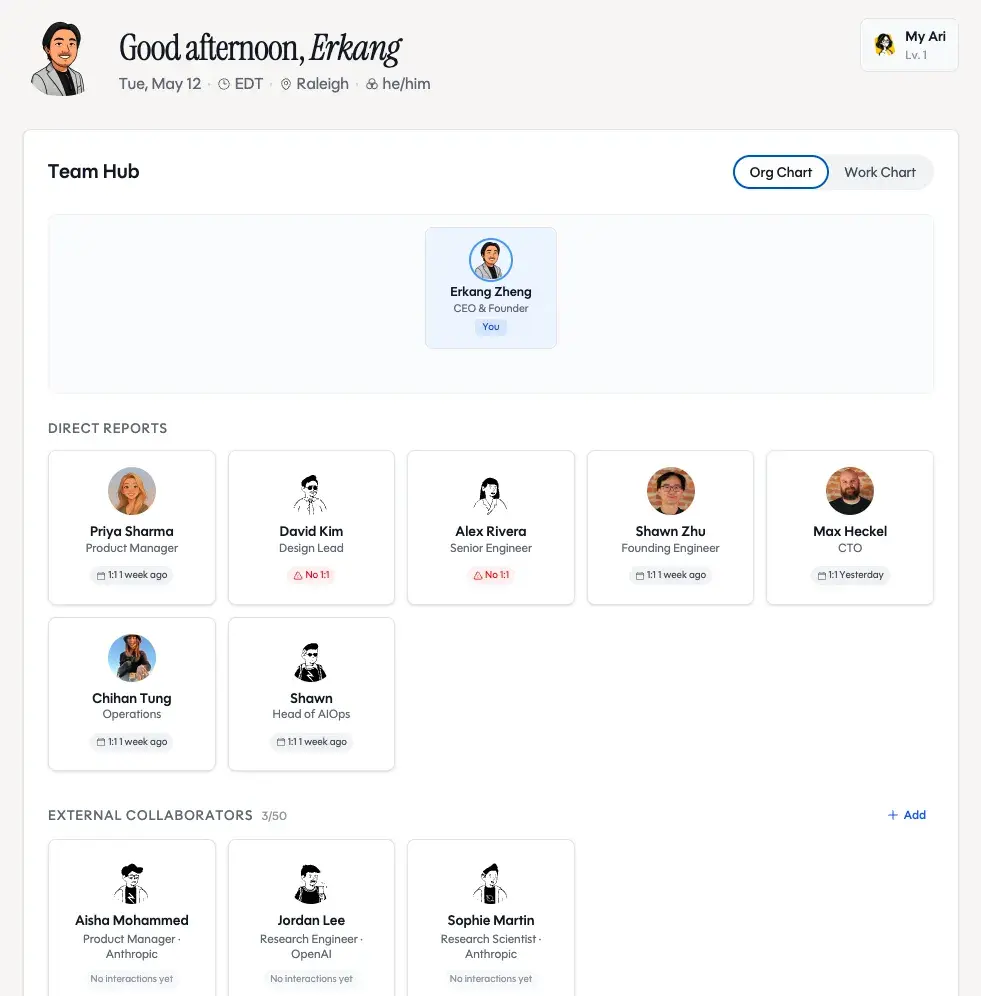
More on manager hubYour whole team on one screen, around its priorities. Marks say what needs you: no 1:1 booked, a project off track, someone who’s earned a thank-you. Your next 1:1s are beside them, soonest first, with Ari’s prep.
How the team is doing, every week
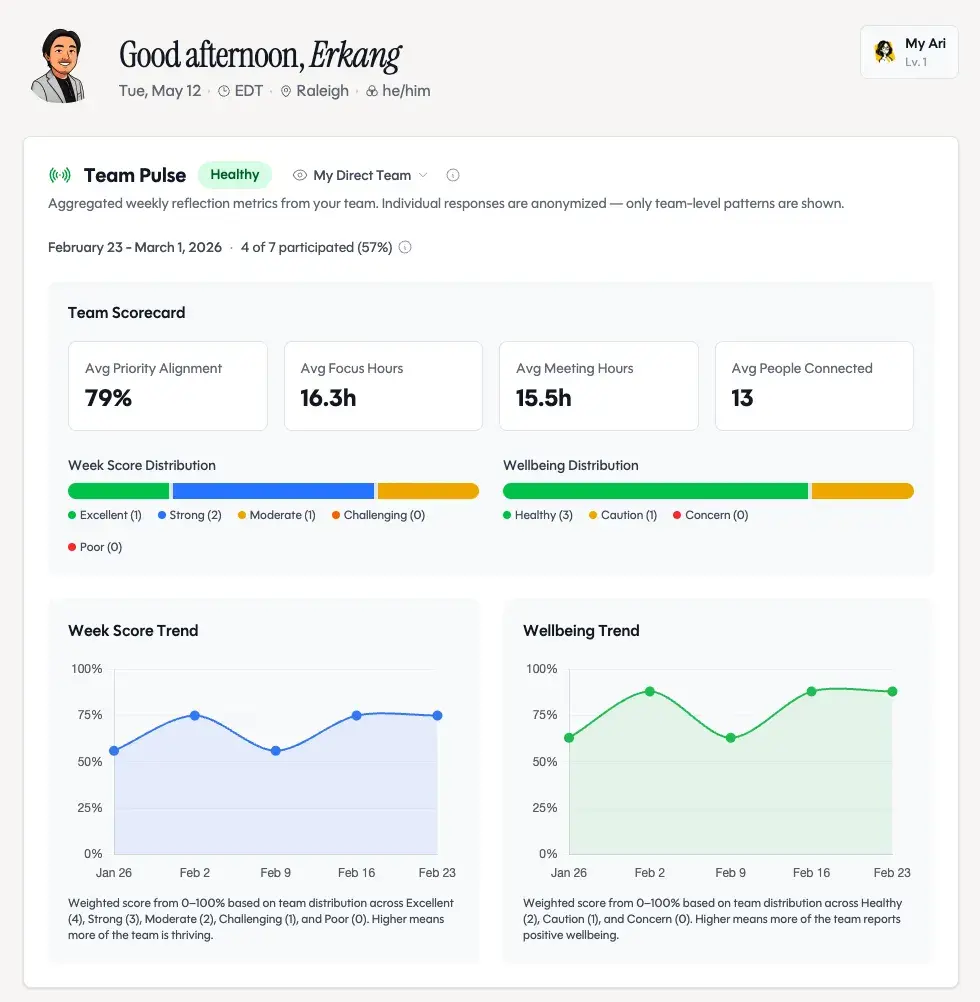
More on team pulseOne read on the week: priority alignment, focus and meeting hours, morale and blockers, with the trend over 13 weeks. It’s built from everyone’s weekly reflections. Nobody’s own words are shown. A short briefing says what to pay attention to, and who to check in with.
Every 1:1 prepped. Everyone coached.
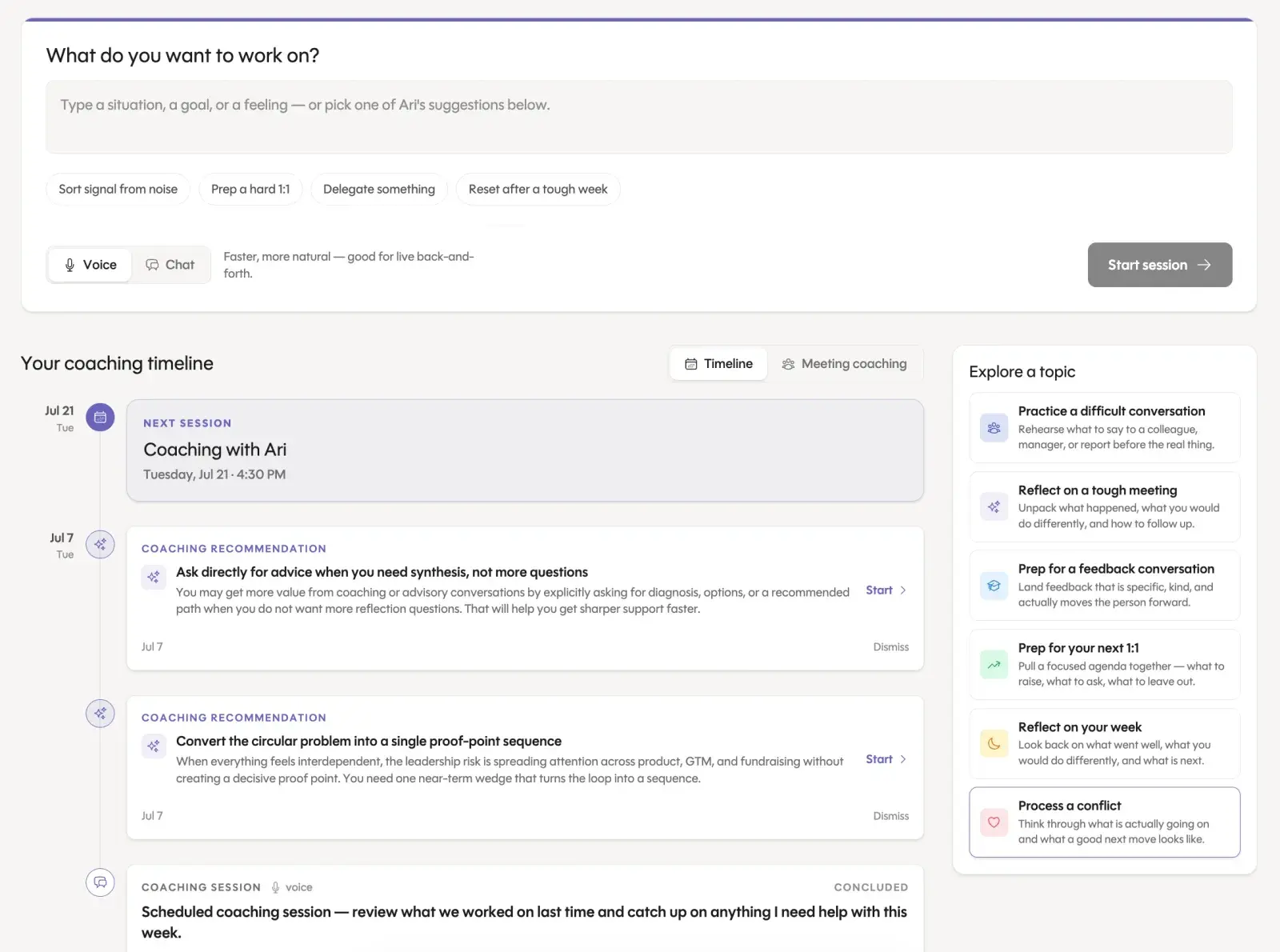
More on coachingAri preps each 1:1 from the real work: what moved, what’s stuck and what to ask. After it, each person gets private coaching on their side of the conversation, once an admin turns that on. Every week, everyone gets a reflection written for them, with one thing to try.
Status that writes itself
More on status reportingEach person’s day becomes a short post in the team’s feed, with anything sensitive left out. Their week becomes a status: results, blockers and next week’s plan. They review it and choose to share it. For leadership, the whole company in one view.
Reviews drafted from the year’s work
More on performance reviewsAt review time, Ari drafts each person’s self-review from their weekly reflections: a month, a quarter, a year, or any range. It follows your review template when an admin has set one. They edit it, then share it with their manager and their manager’s manager. Nobody starts from a blank page, or from memory.
Your team on one screen.
In the app: Team Hub
Around what it’s working toward
Your team sits in a circle around its top priorities, the ones you set. Walk up or down the org one team at a time.
Marks that say what’s worth a look
On your reports: a triangle when a 1:1 is missing, a dot for the worst-off of their projects, and a star when they got kudos, or finished a milestone and nobody has thanked them yet.
Your next 1:1s, ready
Each one soonest first, with the agenda you share and Ari’s prep. The missing ones are listed too: ask Ari to find a time.
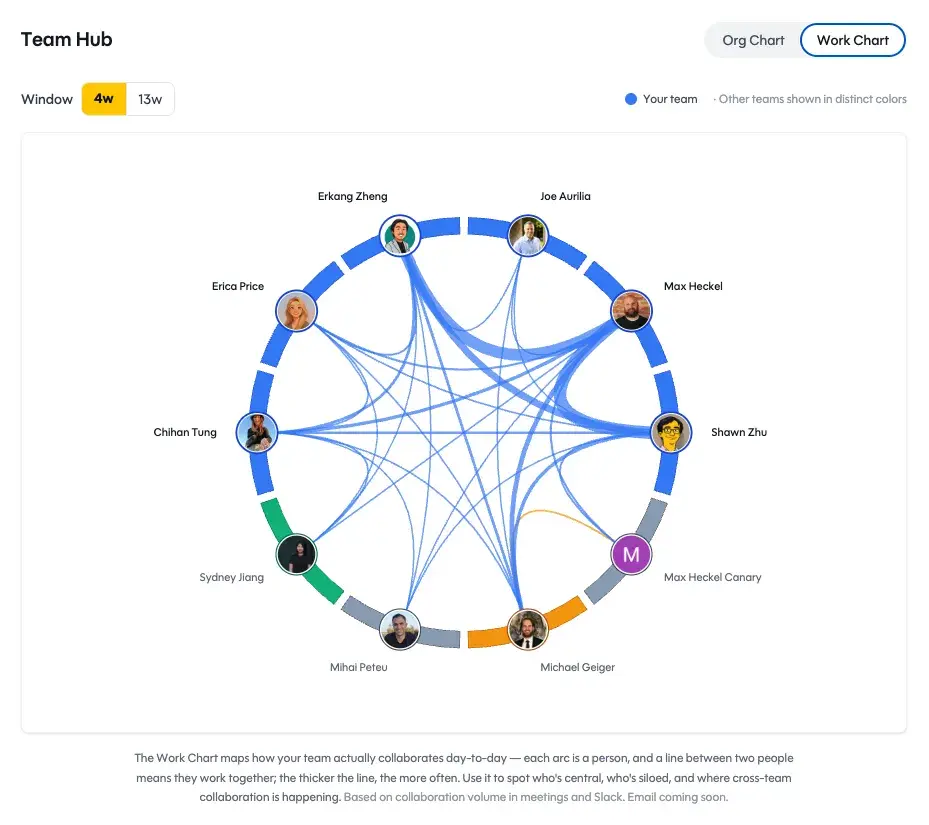
Who works with whom
Graph turns the same circle into who actually works together over the last 13 weeks, and with which other teams.
How each person works
Styles and strengths puts the team on DISC, 16 types, Big Five and Strengths, for everyone who has shared theirs.
Know how the team is doing before it shows.
In the app: Team Pulse
One label for the week
Healthy, Watch or Strained, from the latest week’s signals. If it’s Healthy, move on; if not, the briefing says why.
The numbers behind it
Priority alignment, focus and meeting hours, morale, blockers, and the team’s open and overdue commitments, with 13 weeks of trend on the headline ones.
Who to check in with
A flag names a person and a reason, like alignment and focus both dropping. They’re prompts to start a conversation, not verdicts.
- The team’s week in one label, with the numbers and trends behind it
- A briefing on what to pay attention to
- Who to check in with, and why
- Individual reflections: nobody’s own words are shown
- Anyone who set their reflection to “Don’t share” is never flagged from it
- Small teams: held back until at least three reports have reflected (two in an organization under 50 people)
- Coaching conversations, which Ari doesn’t share with your organization or HR
A coach for every manager, not just the top few.
In the app: Coaching · Meetings · Reflections
1:1 prep, done
Walk into every 1:1 knowing what happened since the last one: your recent messages, calls and emails with them, and what you decided last time.
Coaching after every 1:1
What went well, where to grow and one tip to try next time, from what was actually said. Private to each person. An admin turns it on for the organization.
Rehearse the hard talk
Practice a difficult conversation with Ari playing the other person, by voice or chat, before you have it for real.
Your frameworks, your values
Choose a coaching framework for the organization, like GROW, OSKAR or CLEAR, or add your own guidance. Ari coaches to it, and to your company’s values.
One thing to try, every week
Each person’s weekly reflection leads with a single change in how they work, picked from what mattered most that week.
Feedback and kudos that get given
Honest feedback can be shared anonymously. When someone finishes a milestone and nobody has thanked them, their manager is told, with Say thanks beside it.


Nobody writes a status report. Nobody chases one.
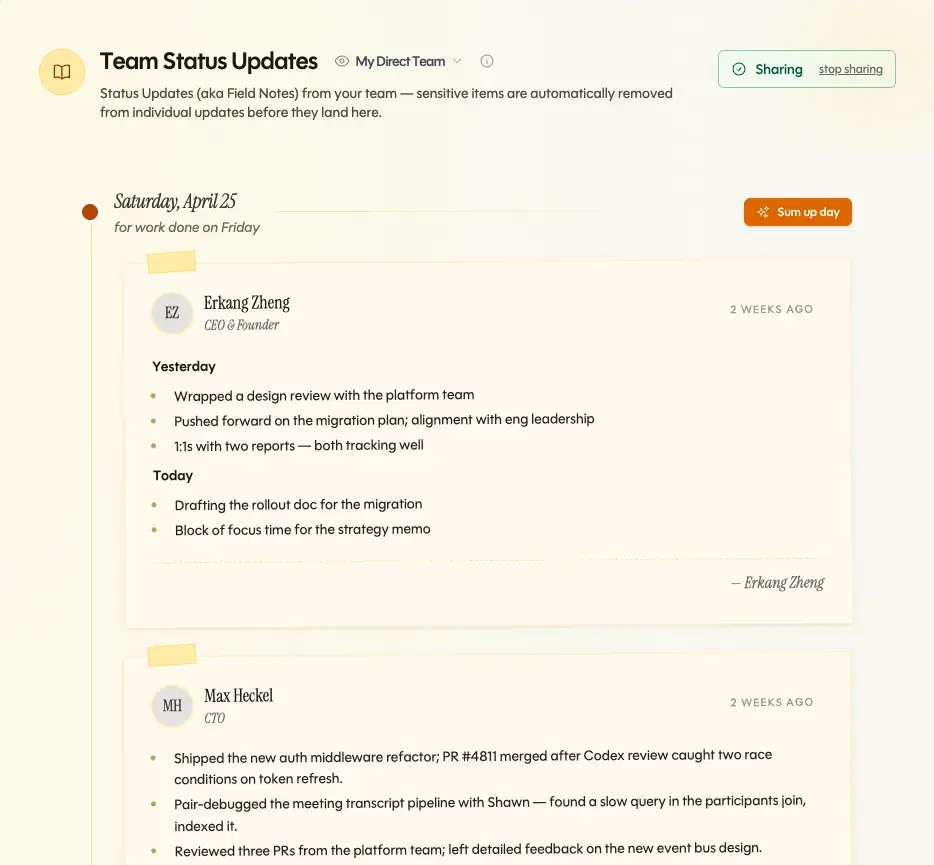
In the app: Team Feed · Weekly status · Dashboard
The day, as a post
Ari turns each person’s day into a few sentences for the team’s feed, in their voice. 1:1s, people matters and anything confidential are left out, whole.
The week, as a status
Results, blockers and risks, and priorities for next week, drafted from their weekly reflection. They edit it, then share it with their manager.
Shared by choice
People opt in to the feed, and see their teammates’ posts when they share their own. A weekly status goes only to the managers above them.
Up the line, already written
A manager reads the team’s statuses in one place, and copies them all as a start on their own update.
The leadership view
The whole company on one dashboard: who’s on the priorities, who’s stretched and what’s at risk.
- 1:1s and other private conversations
- People matters, such as performance, hiring for someone’s role or pay
- Confidential numbers, board and investor material and deals
- Legal, customer-confidential and personal matters
Written from the year’s work, not from memory.
In the app: Performance · Reflections
Pick the period
A month, a quarter, a year, or a custom range. The one you’re in can be drafted so far, and refreshed as it goes on.
Ari drafts it
From their weekly reflections in the period, in date order, plus their current goals and priorities, in your organization’s review template when an admin has set one.
They make it theirs
Each person edits their own draft, then turns on Share so their manager, and their manager’s manager, can read it.
Managers get help too
A manager can ask Ari to help draft feedback for their reports, from the meeting notes and interactions they share, and reads the reviews shared with them in Team Hub.
Consistency and accountability, without the admin.
Every team runs the same rhythm, and every manager gets the same support, because it comes from the work rather than from who remembered to fill something in. It’s one of the systems in the box, on the same login and the same bill as the rest.
One system does the job of the coaching, feedback and performance tools you’d pay for separately:
Good to know about people management.
What is people management in Ari?
Five parts of one system, all read from the work your team already does: a manager hub (Team Hub) with your team and what’s worth a look, Team Pulse for how the team is doing each week, coaching and 1:1 prep for every manager, status reporting that writes itself, and performance reviews drafted from each person’s weekly reflections. Nobody fills in forms.
Does Ari write performance reviews about my team?
No. Each person’s review is their own: Ari drafts their self-review from their weekly reflections over a month, quarter, year or custom range, in your organization’s review template when an admin has set one. They edit it, then share it with their manager and their manager’s manager. Managers can ask Ari to help draft feedback for their reports from the meeting notes and interactions they share.
Can a manager read their team’s reflections or coaching conversations?
No. Team Pulse adds up the team’s weekly reflections into metrics and trends, and individual reflections are never shown. A flag can suggest who to check in with, but only from the reflections of people who share them with their manager. Coaching conversations are confidential: Ari doesn’t share them with your organization or HR.
How does AI coaching for managers work?
Ari preps every 1:1 from the real work, and after it gives each person private coaching on their side of the conversation: what went well, where to grow and one tip to try. Managers can also start a coaching session by voice or chat, or rehearse a hard conversation with Ari playing the other person. Coaching follows the framework your organization chooses, like GROW, OSKAR or CLEAR. Coaching after 1:1s is an organization setting an admin turns on.
How big does a team need to be for Team Pulse?
At least three direct reports, or two in an organization of fewer than 50 people, and a week only appears once that many of them have reflected. Smaller teams are rolled into their manager’s team, so most still get a pulse.
What do we need to set it up?
Your reporting lines. An admin connects your HR system or uploads a list of who reports to whom, once. After that the hub, the pulse and the status feed build themselves from the meetings, messages and reflections that are already happening.

Be the manager whose team stands out.
Start with one team today, or have us roll it out and run it with you.
Built by cybersecurity experts who've defended the world's most critical systems.
Our team built one of the industry's most respected cybersecurity platforms and defended critical banking systems. That same security DNA runs through every line of Ari's code — and your data is never used to train models.
Per-user encryption
Every message encrypted with a key that’s yours alone — never pooled, never used to train models.
Zero-trust architecture
No implicit trust. Every request verified, every response authenticated.
Your data, your control
Keep what you need, delete what you don’t. Your conversations are never monitored.